All Med Admissions Consulting Programs For Freshmen For Sophomores For Juniors For Seniors & Gap Year Students For Career Changers All Dental Admissions Consulting Programs For Freshmen For Sophomores For Juniors For Seniors & Gap Year Students For Career Changers All PA Admissions Consulting Programs For Freshmen For Sophomores For Juniors For Seniors & Gap Year Students For Career Changers All Vet Admissions Consulting Programs For Freshmen For Sophomores For Juniors For Seniors & Gap Year Students For Career Changers Residency BS/MD MCAT Subject Tutoring DAT USMLE COMLEX GRE CASPer Blog Guides Cheat Sheets Free Tools MD and Dr Interviews PA Program Directory Vet School Directory MCAT Practice Test Our Team Our Process Parents Video Reviews Success Stories Acceptance Letters Case Studies Free Events

AdvantageOS: Meet Your Personalized PA School Application Planning Tool

AdvantageOS is an online platform and organizational tool to help you stay on track throughout the PA school application cycle. Students and parents can chat with their dedicated consultant, access curated resources, and receive a week-by-week plan leading to application deadlines.
Female young adult smiling, studying at library

AdvantageOS Simplifies Applying to PA School

You can access your AdvantageOS account anytime via your laptop, phone, or tablet. AdvantageOS is an intuitive tool that provides a structured plan for success while you receive one-on-one guidance from a PA school admissions expert. You can store and manage all your PA school application documents in AdvantageOS, including:
image of correct icon
Transcripts 
image of correct icon
GRE/ PA-CAT Scores
image of correct icon
Pre-PA Resume
image of correct icon
CASPA Experiences
image of correct icon
Letters of Recommendation
image of correct icon
Personal Statement
image of correct icon
Secondary Essays
image of correct icon
Interview Prep
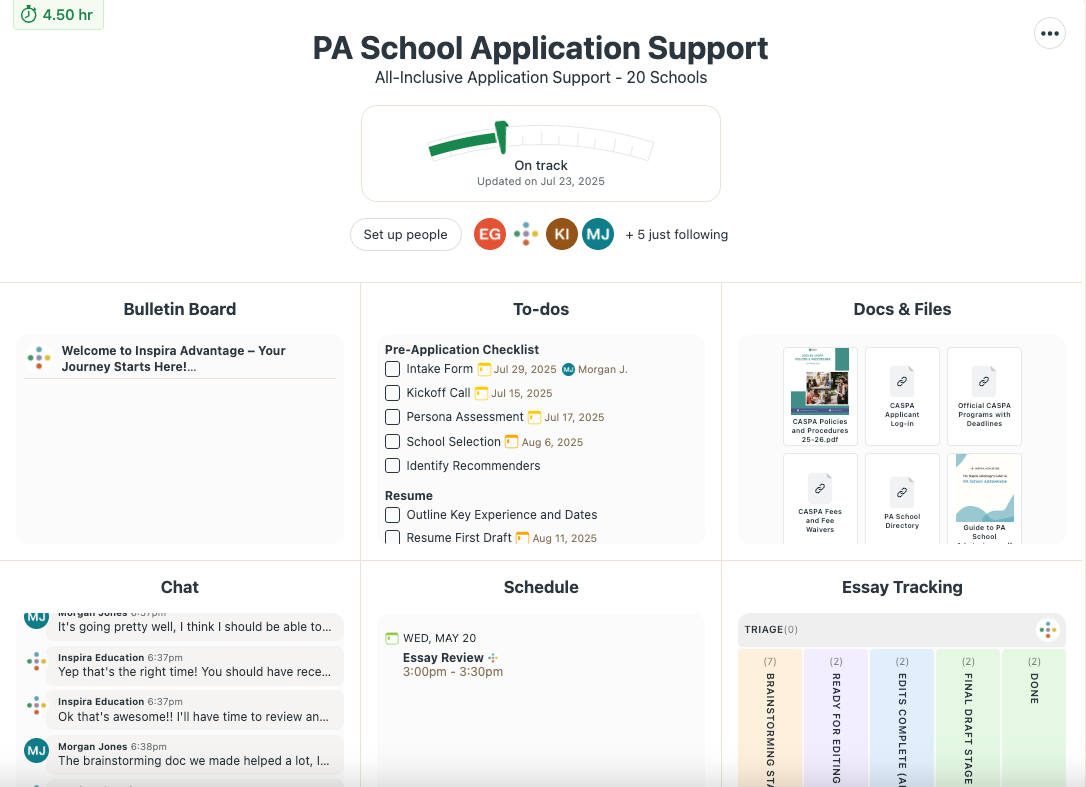
Image of Inspira Advantage's student dashboard home page

See Your Progress Throughout Your PA Application Advising Program

Your counselor will regularly assess your progress throughout your program and move the project tracking needle as necessary. Your consultant will guide you through the next steps at every stage and ensure you’re in good standing to complete PA school applications on time.
Image of Inspira Advantage's student dashboard, progress tracker

Your AdvantageOS Bulletin Board

The AdvantageOS Bulletin Board is home to important announcements, notifications, and other messages from the Inspira Advantage team. You will receive alerts surrounding admissions criteria changes, CASPA deadlines, secondary application release dates, interview schedules, and more. These updates help keep you informed as you work toward crafting a stellar PA school application.

Image of Inspira Advantage's student dashboard, bulletin board

Connect With Your Counselor 24/7

You can use the AdvantageOS messaging system to talk to your counselor anytime. You can ask questions about the admissions cycle, schedule your next meeting, get updates on the status of essay edits, and receive quick feedback on your application materials.
Image of Inspira Advantage's student dashboard, chat page

Get a Step-by-Step Checklist for Every PA School Application Component

Your consultant will create a personalized roadmap to ensure all your application documents are complete and edited to perfection. The PA school admissions process involves collecting and creating many application materials. From program selection and personal statement building to secondary essay writing and interview prep, you will have a focused plan for what to do next.
Image of Inspira Advantage's student dashboard, To-Do's list page
Image of Inspira Advantage's student dashboard, task details page

Get a Structured Schedule & View Upcoming Counseling Sessions

The AdvantageOS scheduling feature allows you to see upcoming calls with your consultant. These calls are focused on specific parts of the application process, such as school selection deep-dives and personal statement brainstorming workshops. You can use the AdvantageOS scheduling platform to see deadlines, important dates, and upcoming sessions with your admissions specialist.
Image of Inspira Advantage's student dashboard, schedule page

Automatic Check-Ins Ensure an Open Line of Communication

Communicate with your consultant weekly with automatic check-ins. These check-ins allow students and parents to ask questions about the PA school application cycle, share topics you want to cover in your next session, and share any feedback or comments with your counselor.
Image of Inspira Advantage's student dashboard, chat page

Your Timesheet & Activity Log

Your AdvantageOS timesheet will show you when you met with your consultant, how many hours you spent with each other, and notes about the tasks you completed. The activity log provides an overview of items your counselor has scheduled or added for you, including progress check-ins, essay editing sessions, mock interview practice simulations, and more.
Image of Inspira Advantage's student dashboard, timesheet pageImage of Inspira Advantage's student dashboard, schedule log

Keep Track of PA School Application Documents & Access Exclusive Resources

Stay organized throughout the cycle by keeping all your CASPA and secondary application documents in one place. You can also access CASPA materials, Inspira Advantage PA school guides, personal statement and essay examples, PA program directories, and more to help you gain more insights into how you can position yourself as the ultimate applicant.
Image of Inspira Advantage's student dashboard, docs & files page

Essay Editing Tracking & Feedback

Your consultant will evaluate your program list to determine which schools require additional essays and materials. They will triage all CASPA and secondary application components to ensure everything is under control and that your documents are polished to perfection before submission deadlines.
Image of Inspira Advantage's student dashboard, project management page

Can AdvantageOS Make Applying to PA School Simple? The Answer is YES!

Can I see my progress at every step?
YES!
Can I link files from Google Docs, Figma, Dropbox, and other apps?
YES!
Can I see everything requiring my attention on one screen?
YES!
Can I use AdvantageOS to message my PA school counselor?
YES!
Can parents use AdvantageOS to check in on their child’s progress?
YES!
Can I access personalized PA school admissions resources?
YES!
Can I store all PA school application materials in AdvantageOS?
YES!
Can I see my schedule and when I will meet with my consultant?
YES!
Can I use AdvantageOS to book meetings with my counselor?
YES!
Can I see all activity throughout my program?
YES!